
GTA 2
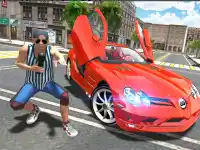
Get ready to experience the thrill of Hypercasual gaming with GTA 2, a chaotic driving experience set in a small city. The game's old-school damage physics and pixelated look will transport you back to the retro days of gaming.
How To Play GTA 2
Launch the game and start completing missions or roaming around the city, causing damage wherever you go. Use the arrow keys or WASD to steer and accelerate your vehicle.
Controls and Features
Driving in GTA 2 is easy and fun, with simple controls that make it easy to navigate the city's roads and alleys. Use the arrow keys or WASD to move, spacebar to brake, and other keys for shooting or special actions.
Tips
Driving in GTA 2 can be challenging, especially with the loose physics and pixelated graphics. To stay on the road, try to keep your speed slow and manage your speed carefully.
FAQ
What are the controls in GTA 2?
Use the arrow keys or WASD to steer, spacebar to brake, and other keys for additional actions.
What makes GTA 2's driving experience unique?
The game features old-school damage physics and a pixelated look, creating a true retro vibe.
Are there timers in GTA 2?
No, there are no stated timers in the game.
Can I play GTA 2 with friends?
Unfortunately, GTA 2 is a solo experience, so you'll need to play by yourself.
About this game
- Supported devices
- Desktop
- Genre
- Hypercasual Games
- Release date
- 24 October 2024
- Latest update
- 24 October 2024
- Rating
- No ratings yet
Supers Cars Games
1pp

Rescue Bus
Cars Parking Express
Impossibles Cars Stunts
Driver 2

Supers Cars Games Online
Prado Parking games car Parking
Taxi Drive
Drift Mode Drifting Game 2022
Prado Drift Parking -Free
Luxury Car Parking Prado

Mountain Car Driving Simulation
Hard Car Driving-Park
Tractor Parking Simulator

Sports Car 2022 Driving
Parking Jam 2022
passenger Overloaded

4x4 OffRoad New Version
Modern Bus Parking Rcc
Car-Simulation-Free
Prado Parking Free
Car Parking Multiplayer
Car Parking Challenge