 friv.org.es

Popular Games
Last Played


Bricks Puzzle Classic
1 plays

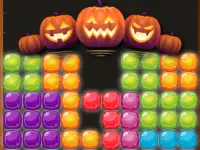



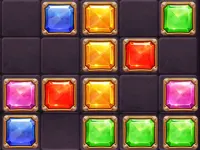
































Bricks Puzzle Classic
Bricks Puzzle Classic offers a colorful and fast-paced experience where you stack falling bricks to clear lines and chase a high score. Its simple mechanics make it easy to pick up, while the quick action keeps you engaged. It is a great choice for killing time when you are bored.
How To Play Bricks Puzzle Classic
Use the arrow keys to move the bricks, the up arrow or space bar to rotate them, and the down arrow to speed up their fall. Your goal is to align the bricks to form complete horizontal lines, which will then clear from the board.
Controls and Features
The game uses arrow keys for movement and rotation, with the down arrow to accelerate the fall. As you progress, the falling bricks speed up, increasing the challenge. The main objective is always to line up the bricks to clear rows and score points.
Tips
Try to keep your stack low and manageable. Use the acceleration controls to slow down and plan your placements carefully. This helps prevent the bricks from reaching the top and ending your game.
FAQ
What are the controls for Bricks Puzzle Classic?
You use the arrow keys to move and rotate the bricks. The down arrow speeds up the fall, and clearing lines is the main goal.
What is the main objective in the game?
The main objective is to align the falling bricks to form complete horizontal lines, which will then clear from the screen to keep your stack low.
How does the game get more challenging?
The game gets more challenging because the falling bricks gradually speed up as you progress, forcing you to make quicker decisions and placements.
Is there a way to control the brick speed?
Yes, you can use the down arrow to accelerate the fall, which helps you control the pace and plan your moves more effectively.
About this game
- Supported devices
- Desktop
- Genre
- Racing Games
- Release date
- 24 October 2024
- Latest update
- 24 October 2024
- Rating
- No ratings yet